
Vibe coding is a hell of a revolution. It’s deflating the cost of writing code for developers. And it’s opening up the building of websites and other digital products to a much wider crowd than ever before.
Vibe coding is also a bit of a trap. A trap for people who think they can get by without developers — or without developer thinking. And for developers themselves? For some, a huge opportunity. For others, pain.
I thought my site Vzhůru dolů was basically dead. Vibe coding brought it back to life — not just technically, but editorially too. If I write only one article this year, it has to be this one.
I’ve tried to build this piece as a collage: motivation, small essays, and practical tips. As for the topic itself, I’m currently in the head-exploding phase. So take me with a grain of salt — but we have to start here.
Swept Off My Feet
I spent more than 20 years actively building web applications, and I’ve been circling web technologies for 27 years now. But I’ve never experienced anything like this in the field. And I’m not alone:
“I just sat down with Windsurf and in three days I have a new version that within a week will do more than my nine months of work. It’s genuinely insane.”
Vibe coding democratises technology and development work. It makes it accessible to everyone:
“I sat down with Wix Vibe and in two hours I had a finished election campaign site, CMS included. That used to be several weeks of evening work in WordPress.”
But developers and technically skilled people are not out of work. They have an advantage and a head start — as long as they don’t sleep through it. The window of opportunity is open. Wide open.
Okay. Beyond the enthusiasm, let’s also try to stay sober:
“When you know exactly what you want, and you also know the best way to do it, AI saves you a lot of work. When you don’t, the result can be very bad.”
”Vibe… What?”
Let’s start with a definition.
Vibe coding is a way of programming where you describe your intent in natural language and AI generates the code for you. Instead of writing individual lines, you talk to a model about what you want to do.
The name comes from Andrej Karpathy:
“…you fully give in to the vibes, embrace exponentials, and forget that the code even exists.”
My main tool is Cursor — an editor built on top of VS Code with AI baked in. There are others: Windsurf, GitHub Copilot, Google’s Antigravity is having a moment, and plenty more. What they share is that the AI understands the context of your project and can actually work inside it.
Cursor's Agent mode is glorious — especially when you keep thinking like an engineer. And the interface is familiar from VS Code.
Cursor has an Agent mode where the AI works autonomously. It runs the terminal itself, reads files, installs libraries, writes to multiple files at once. You approve the work or steer it in a different direction.
The difference from traditional development? You’re not wrestling with syntax, not googling documentation, not writing boilerplate. You say what you want and the AI writes it. Then you review, fix, and direct.
It’s like having a junior who writes fast and writes a lot — but needs your guidance.
Vibe Coding vs. Vibe Engineering
Not all developer work with AI is the same. Let’s draw at least two working distinctions.
-
Vibe coding — I don’t deal with the code at all. I sit down at Cursor or Macaly, describe what I want, and let it run. This is perfect for prototypes and demos (where you’ll throw the code away anyway), simple sites and landing pages, or one-off tools. I also use “vibe coding” as a broader label for this whole space.
-
Vibe engineering — an engineering approach beyond vibe coding. Here it’s no longer about “let it run,” but about deliberate collaboration. You design the architecture, break the problem into sub-problems, and the AI implements according to your specs. But you craft those specs together. The developer and architect thinking stays with you. AI is a tool, not a replacement for your brain.
We could argue about definitions, but I’d rather not. They’re just words. I mention them so that those of you who feel lost can at least tell apart the different flavours of “vibing” code.
A side note: I’ve always tried to translate terms into Czech, but here I give up. This field moves so fast that all of this might just be a waypoint on the road to even greater AI autonomy.
What does matter, I’ll mark again with a quote from Marek Prokop:
“Watch out for this, and learn to program. It’s needed even in the era of AI.”
This is the key difference between vibe coding and vibe engineering. You can manage vibe coding without deep knowledge — for a prototype or a simple landing page, that’s enough. But the moment things get more complex, you need to be an engineer. To understand what the AI is doing. To be able to fix it when it gets things wrong.
Where Do I Start as a Beginner?
Jindra Fáborský sorted this nicely into levels based on project complexity:
- Level 0 — one-off tools and little hacks
- Level 1 — landing pages
- Level 2 — whole websites
- Level 3 — app prototypes
- Level 4 — internal tools
- Level 5 — production applications
The higher the level, the more you need an engineering approach. Levels 0–2 are fine with vibe coding. From level 4 up, you have to be a vibe engineer.
Great news for developers. For non-coders? Don’t jump straight into rewriting the app that pays your bills. Please, don’t do it.
Me and Vibing: Four Examples
Theory is nice, but let’s get to what I actually did over the last two months.
Example one: a prototype of the FrontKon site
On the team behind the FrontKon conference, we’re discussing a new website. I have a fairly clear opinion and vision for it. To make it easier to show the team what I mean, I go and build a prototype.
One day of work, including nearly final content. I don’t deal with the code — it’ll be thrown away, it’s a prototype. I used to build prototypes like this over weeks. By hand. And then they’d often get discarded, which for prototypes is a good thing.
First explosion of Michálek’s head. But also the first realisation that vibe coding isn’t enough. That I have to engage the developer part of my brain. That I need to read what Cursor says and poke at it a little.
Example two: a website for my son
My seventeen-year-old son wants to start his first business with a friend — cutting reels out of videos.
We sit down together at Cursor. I expect it to be more complicated. Arguments about the look and so on, you know how it is… a teenager. A two-sentence prompt. He doesn’t like the result, fair enough.
I ask Cursor what style might appeal to Gen Z. It gives us four options. My son picks one, Cursor redoes it, and he’s thrilled.
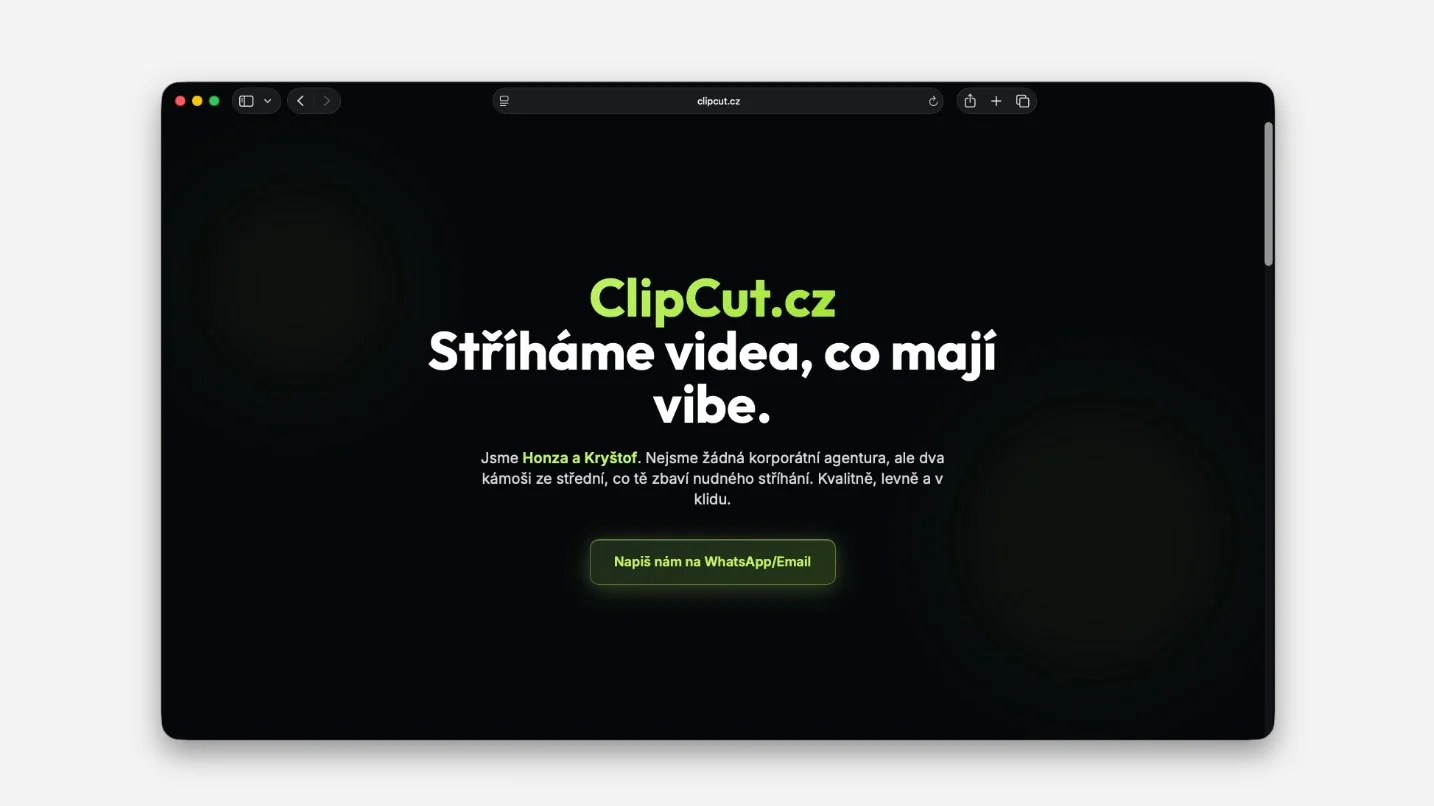
The Clipcut site, done in 15 minutes. Style picked from Cursor's Gen Z recommendations.
It’s done in 15 minutes. I’m laughing hysterically the whole time. My son asks if I’m okay. I say yes — but I used to spend days or weeks on this. And clients had no chance to change it so easily.
The tinkerers who hand-built small websites are dead. Macaly, or something like it, can be handled by anyone who can describe what they want.
Example three: editing copy in PageSpeed.ONE
I love writing. I go to edit some copy in our help docs over at PageSpeed.ONE. Cursor understands the context exactly and can imitate a specific writing style. I just tell it roughly what I want to write and roughly where. It edits the Markdown, adds links, runs a check.
As my colleague Michal Matuška puts it: “We all have to be full-stack.” Including content authors. Including the company CEO.
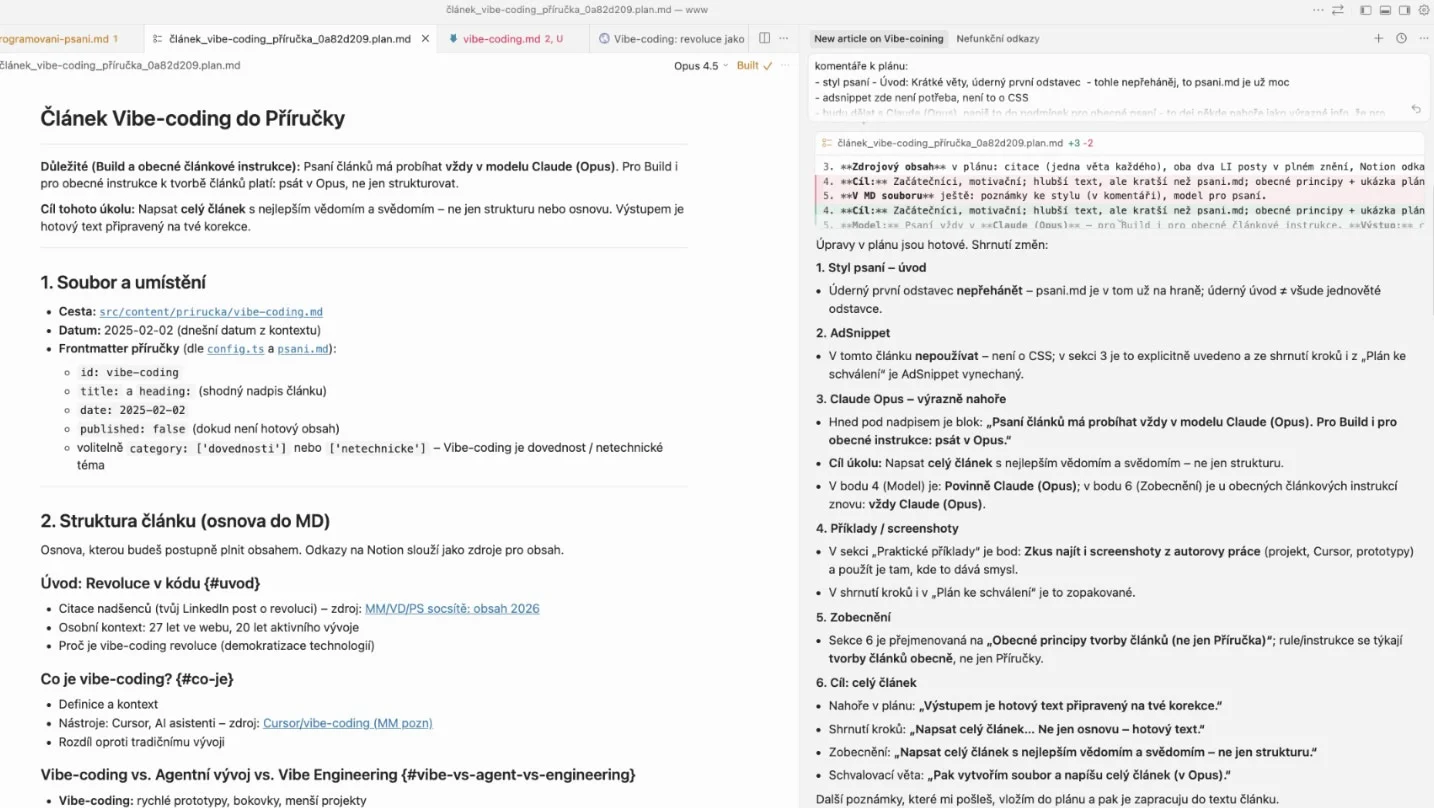
Vibe writing for Vzhůru dolů — Cursor understands context, can imitate a writing style, add back-links, and iterate beautifully, much like during software development.
Example four: migrating Vzhůru dolů from PHP to Astro
For two years I’ve wanted to ditch the old dev stack on Vzhůru dolů. It runs on outdated PHP and the Perch CMS, which nobody maintains anymore. There’s an old database in there, and the whole thing is so fragile that I was even scared to look at it.
I want a modern dev stack, I want it all dumped into Markdown, kept in a single repository and put on GitHub.
In the “old world,” though, this would have meant sacrificing several weekends, or investing at least 50 — more likely 100 — thousand CZK into someone to handle it. I want none of that.
This is already a relatively complex project. The first attempt with Cursor didn’t work out. I took the old PHP repo and asked it for a rewrite into the new one. It drowned in the context of two different technologies.
It turns out I have to learn the new dev stack, I have to give Cursor good instructions, and I have to watch what it’s actually doing. To be the architect, not just a spectator.
I could have been a spectator and had it faster. But it wouldn’t be sustainable long-term — and that’s not what I want.
In the end, it’s done. Two to three days of work in total — still amazing, honestly. It’s built on Astro, available on GitHub, and has been live since the end of January.
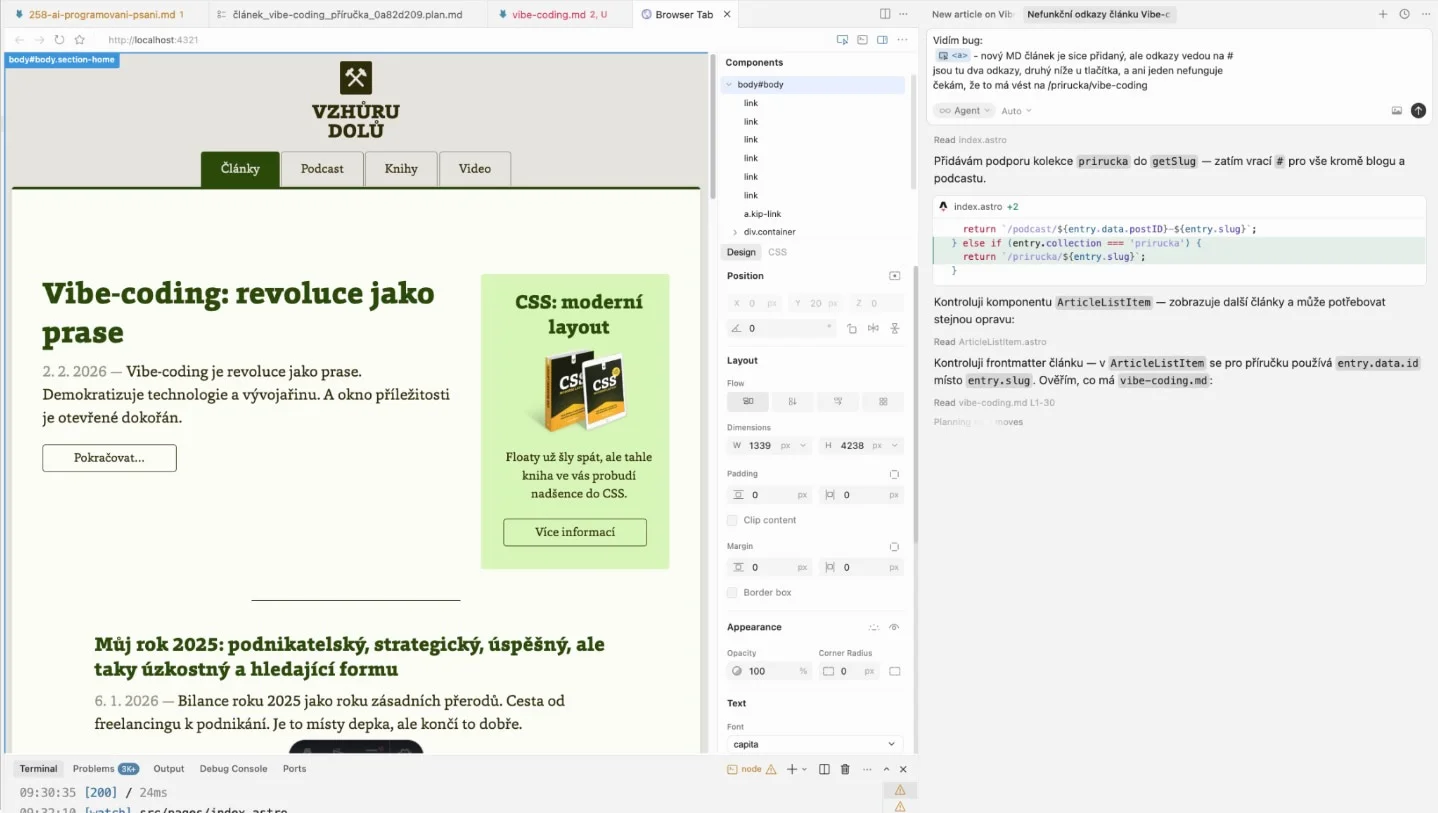
Migrating Vzhůru dolů to Astro. Done in 2–3 days of work.
Developers Out of Work?
Developers should fear for their jobs because of AI, they said. Nonsense. Developers have a big future, precisely because of AI — that’s what I say.
Yes, some do need to worry. Coders, hackers in the bad sense, sloppy copy-pasters… they may all lose their current jobs.
But then there are the real developers. Developers with engineering thinking, knowledge of the technology, experience. Architects. Vibe engineers.
They have an enormous advantage — an algorithmic way of thinking. The ability to break a problem into sub-problems. To design an architectural solution. To push back on the AI technically, to improve its work.
To not get bullshitted by Cursor.
Just sit next to someone who lacks this for a moment. Watch how they write a prompt. And suffer — quietly, preferably.
Two types of developers
If I simplify a lot, developers split by motivation:
- Some love building products — websites, apps, a service for people.
- Others love writing code and fussing over it. They’re in love with a specific technology.
The current AI wave strongly favours the first group and can put pressure on the second.
It will get harder and harder to be fulfilled solely by writing beautiful code, and we’ll focus more on the outcome that the technology delivers.
With LLMs you can build a great product, be highly technical, and even have quality code — all without writing a single line of code yourself. And I think this will be hard for a lot of people in that second group to accept.
You have to be a developer, or gradually become one
When I was building the prototype of the new FrontKon site, Cursor wanted to do server-side rendering with a custom generator running headless Chrome on top of an SPA. Technically it worked. In practice it was nonsense — far better solutions exist.
If someone without experience had received this proposal, they probably would have accepted it. And they’d have a problem.
If you want to “vibe” products, sooner or later you have to become someone who understands the craft of development.
”Software is eating the world”
Yes, a large share of tiny applications will be built by CEOs, marketers, and clients themselves — the kind of apps engineers wouldn’t want to build anyway.
But software is greedy; it’s far from done eating the world. A huge wave of software is coming that previously couldn’t exist because it was too expensive. This won’t threaten developers.
Yes, a breakthrough we don’t see could always arrive. But right now it isn’t happening. Developers aren’t losing their jobs — at least not en masse and all at once.
A Few Concrete Cursor Tips
Let’s get to how to squeeze the most out of vibe coding.
Modes in Cursor
Cursor has four main modes:
| Mode | Code changes | Autonomy | When to use |
|---|---|---|---|
| Agent | Yes (multi-file) | Maximum | New feature from scratch, refactoring |
| Plan | Design first | Medium | Complex integration, you want control |
| Debug | Yes (targeted) | High | Bug fixes, logs |
| Ask | No (text only) | None | Consultation, understanding code |
Agent is the most powerful but also the most expensive on credits.
For everyday work, Plan or Ask is often enough. Personally, I always start a new feature with Plan. We iterate over the brief, and only then do I let the Agent loose.
Context shortcuts
Cursor has handy shortcuts for working with context that sharpen what you’re talking to the model about:
@Codebase— searches the whole project, best for complex changes@Files/@Folders— targeted context, saves tokens@Docs— pull in documentation by URL@Web— search the internet
The absolute killer is the ability to open a browser inside Cursor and point at the specific elements you want to change.
Vibe rules
Three rules for working effectively — the ones that, out of all rules, help the most:
- Decomposition. Don’t ask for everything at once. Move in small features and iterations.
- Cursor rules.
Set up
.cursor/rulesin the project root. A persistent “vibe” setting — e.g. “Write in TypeScript, speak English, use this code style.” - Sniper vs. shotgun.
For small edits, use
Ctrl+K(inline edit) instead of rewriting an entire file through the agent.
Models
I don’t feel much need to experiment with models, because the default Composer suits me beautifully, but I do switch occasionally, roughly like this:
- Default (Composer): Fast, for everyday work. Enough for me in 80% of cases.
- Claude Sonnet: Smarter, switch it on when the default gets “stuck in a loop.” A killer for text.
- Gemini: For working with huge context (the whole repository at once). I switch to it only occasionally.
Flow Not Found… or Is It There After All?
This surprised me the most. I was afraid I’d lose the joy of creating while vibing, but the deep work is still there — it just looks different now.
It’s not about polishing code. It’s not about tuning semicolons and brackets. It’s about direction, architecture, context. About building the final product.
I hand off a task and wait. Then I review, fix, and steer further. Less typing, more thinking.
And you know what? Surprisingly, the deep work and the flow are not missing. I still reach the state where I forget about the world and I’m immersed in the problem. The problem is just different — it’s not “how do I write this function,” but “how do I design this whole thing so it makes sense.”
But this won’t suit people who don’t experience the final product that comes out of them so much, and instead enjoy fussing over the code.
This Is Big, but We Still Need People
AI is not a replacement for developers. It’s a multiplier.
We still need people. People control the machines and will keep controlling them. I hope.
We need people for meetings, for kitchen conversations, for the whole offline context that’s still enormous. For accountability and security. For decisions that require understanding the broader context of the company and the team.
Vibe coding democratises technology. Developers and technically skilled people have an advantage. But they have to use it.